
Beyond WhatsApp: The Complete n8n Playbook for Automating Every Department of Your Small Business
n8n automation for small business: You’ve automated your leads. You’ve automated WhatsApp. Here’s everything else n8n can quietly take off your plate.
Introduction — the part of the business nobody automates first (n8n automation for small business)
If you’ve been following this series, you already know the WhatsApp story. Leads captured instantly, an AI agent handling the repetitive questions, appointments confirming themselves, abandoned carts recovering on their own. That’s real, and for most Indian small businesses it’s the correct place to start, because customer-facing revenue leaks are the most painful and the most visible.
But here’s what nobody tells you when you’re three workflows deep and feeling good about the hours you’ve clawed back: WhatsApp and lead capture are maybe 20% of where a small business actually bleeds time. The other 80% is quieter, less glamorous, and almost never gets automated first — which is exactly why it’s still sitting there costing you hours every single week.
Walk into the back office of almost any growing Indian SMB and you’ll find the same unglamorous truth. The owner or a single overworked accountant is manually matching bank statements to invoices at 11 PM. Someone is retyping the same vendor’s PO into three different spreadsheets. A new hire’s onboarding paperwork is scattered across email threads, WhatsApp forwards, and a physical folder. Social media posts are “supposed to go out” three times a week and mostly don’t. GST reconciliation happens in a panic on the 18th of every month.
This is the second half of the automation story — the part that doesn’t get a launch announcement, but genuinely determines whether a business scales sanely or scales into chaos. Let’s go through it department by department, honestly, the way we did with WhatsApp.
Why the “boring” departments matter more than they look
There’s a reason finance, inventory, HR, and reporting automations get skipped. They don’t feel urgent the way a missed customer lead feels urgent. Nobody loses a sale in the next five minutes because GST reconciliation is manual. But the cost shows up differently — it compounds as accumulated administrative debt. Every month you don’t automate invoice matching, every quarter you don’t automate stock reconciliation, the gap between what your business could handle and what your team can actually handle without burning out gets wider.
The businesses that scale past ₹1 crore, ₹5 crore, ₹10 crore in revenue in India without proportionally growing their back-office headcount are, almost without exception, the ones that treated these “boring” processes as seriously as they treated customer acquisition. n8n is well suited to this precisely because it isn’t a single-purpose tool — the same workflow engine that fires a WhatsApp message can just as easily read a bank statement, update an inventory sheet, or file an HR document, because it’s built around connecting anything to everything, not around one specific use case.
Workflow 1 — Finance and GST: closing the books without the 11 PM panic
For most Indian small businesses, finance automation delivers the fastest, most measurable ROI of anything in this list, because the pain is monthly, recurring, and precisely quantifiable in hours.
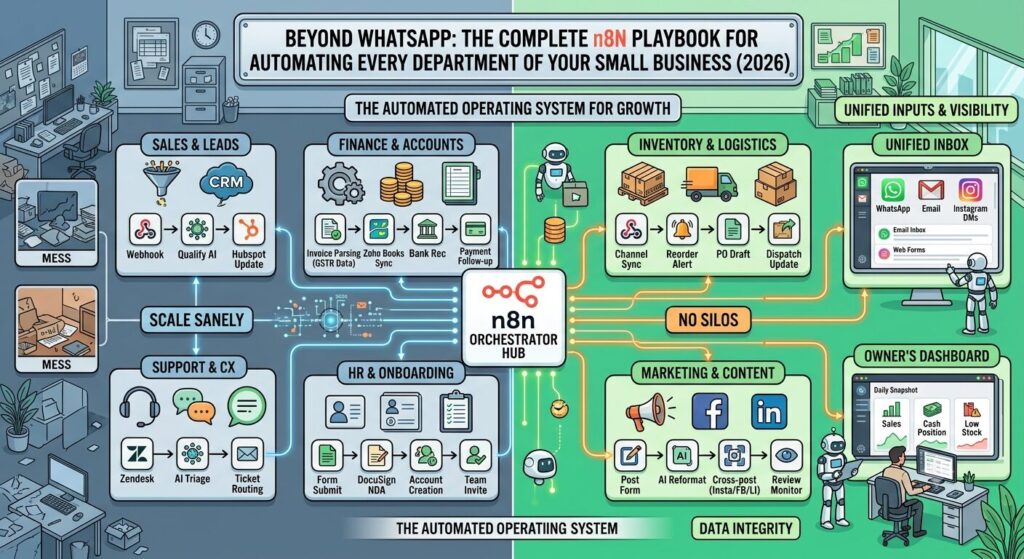
Invoice-to-ledger matching. The core workflow: a Gmail or Outlook trigger watches for incoming vendor invoices (PDF attachments). n8n extracts the invoice using an AI document-parsing node — vendor name, invoice number, GST amount, line items — and cross-checks it against purchase orders already logged in Zoho Books, Tally, or a Google Sheet. If it matches within tolerance, it’s auto-approved and logged. If there’s a mismatch — wrong GST rate, a quantity discrepancy, a duplicate invoice number — it’s flagged and routed to a human with the specific discrepancy highlighted, rather than the whole invoice needing to be manually re-checked from scratch.
Bank reconciliation. A scheduled trigger pulls your bank statement (via your bank’s API where available, or a CSV export watched via a folder trigger) once a day, matches transactions against invoices and expense entries already in your books, and flags anything that doesn’t reconcile — a payment received with no matching invoice, an expense that cleared twice, a vendor paid at the wrong amount. What used to be a stressful end-of-month scramble becomes a five-minute daily check of an exceptions list.
GST filing preparation. This is the one Indian SMB owners consistently underestimate the pain of. n8n can aggregate your GSTR-1 sales data and GSTR-3B purchase data continuously through the month — pulling from your invoicing tool, cross-referencing HSN codes, and flagging invoices with missing or inconsistent GST numbers as they’re created, not discovered during filing week. This doesn’t file your GST return for you (and it shouldn’t — that stays with your CA, deliberately), but it means your CA receives clean, pre-reconciled data instead of a shoebox of receipts, which cuts filing time and, more importantly, cuts the errors that trigger notices.
Expense capture from receipts. A more field-level version of the same idea: staff forward a photo of a fuel receipt, a courier slip, or a stationery bill to a dedicated WhatsApp number or email address. n8n reads the image with a vision-capable AI node, extracts amount, vendor, date, and category, and logs it directly into your expense tracker with the original image attached as proof. For a business running a small delivery fleet or field sales team, this alone can eliminate the monthly ritual of chasing five people for a shoebox of crumpled receipts before the books can close.
Payment reminders and receivables follow-up. The mirror image of the finance problem isn’t just what you owe — it’s what customers owe you. A scheduled workflow checks invoices past their due date, and for anything unpaid at 7, 15, and 30 days, sends an escalating but polite reminder — first a gentle nudge, then a formal follow-up, then a note that flags the account to you directly for a phone call. Chasing receivables is one of the most emotionally draining tasks for a small business owner precisely because it feels personal; automating the first two reminders means the awkward human conversation only happens for the accounts that genuinely need it.
A clear-eyed caution here: do not let an automation auto-file anything with the GST portal, auto-approve payments above a threshold you’re comfortable with, or make final tax-treatment decisions. Automate the aggregation, matching, and flagging. Keep a human — you or your CA — as the final approver on anything that touches money leaving the business or a government filing. That boundary isn’t a limitation of the tool; it’s good financial discipline regardless of what’s doing the aggregating.
Realistically, a small business with even a modest transaction volume — say 200 to 400 invoices a month between sales and purchases — sees five to ten hours a week recovered just from invoice matching and reconciliation, and that number climbs during GST filing week specifically, where the prep time can drop from a stressful two-day scramble to a same-day review of an already-clean dataset.
Workflow 2 — Inventory and supply chain: knowing what you have before a customer asks
For any business holding physical stock — retail, D2C, wholesale, manufacturing — inventory drift is one of the most expensive silent problems there is: overselling stock you don’t have, reordering stock you already have too much of, and discovering both only when a customer complaint or a dead-stock write-off forces the issue.
Multi-channel stock sync. If you sell through your own website, Amazon, Flipkart, and a physical counter, keeping stock levels consistent across all four without automation is close to impossible past a certain order volume. A webhook-driven workflow listens for a sale on any channel, decrements stock in a central source of truth (Zoho Inventory or a well-structured Google Sheet for smaller operations), and pushes the updated count back out to every other channel within minutes — so you stop overselling a product that sold out on Amazon an hour ago but still shows “in stock” on your own site.
Low-stock and reorder alerts. A scheduled workflow checks stock levels daily against a reorder threshold you set per SKU, and when something crosses it, automatically drafts a purchase order to the relevant vendor — populated with the vendor’s usual quantities and last agreed price — and sends it to you (or the vendor directly) for one-click approval. The manual version of this task is someone remembering to check forty SKUs’ stock levels every few days; the automated version means nothing runs out silently.
Vendor and delivery tracking. Once a PO is placed, n8n can watch for the vendor’s confirmation email, log expected delivery dates, and send a reminder if a delivery is overdue — turning “we’re still waiting on that shipment, weren’t we?” from a memory-dependent question into a system-tracked fact.
Returns and reverse logistics. Returns are one of the most operationally messy parts of running a D2C or retail business, because a returned item needs to be received, inspected, and added back to sellable stock — or flagged as damaged and written off — often across three different people. A workflow triggered by a return request can generate the return shipping label automatically, notify the warehouse to expect the item, and once a status update confirms receipt, either restock the item across all channels or route it to a damaged-goods log, depending on the condition noted. What’s typically a two-day, multi-person handoff becomes a same-day, mostly self-tracking process.
To put a number on it: a small retail operation moving, say, 500 orders a month across two or three channels typically loses four to six hours a week just to manual stock-count corrections and channel updates after the fact — hours that show up as overselling apologies and manual “sorry, that’s actually out of stock” messages rather than as a clean line item anyone notices until it’s automated away.
Workflow 3 — HR and onboarding: the paperwork that eats a founder’s Monday
Small businesses rarely have a dedicated HR function, which means onboarding, leave tracking, and document collection usually fall on whoever has five spare minutes — often the founder, at the worst possible time.
New hire onboarding. When a candidate accepts an offer (tracked via a simple form submission or a status change in your ATS), n8n can trigger the entire onboarding sequence automatically: send the offer letter and NDA for e-signature (via a tool like Zoho Sign or DocuSign, both of which n8n connects to natively), create the employee’s accounts across the tools they’ll need (Google Workspace, Slack, project management), add them to the correct payroll and PF/ESI systems checklist, and schedule a welcome message and first-week check-in reminder. What used to be a founder manually working through a mental checklist becomes a sequence that fires identically for the fifth hire as it did for the first.
Leave and attendance tracking. A simple WhatsApp or form-based leave request can trigger a workflow that checks the employee’s remaining leave balance (pulled from a tracker sheet), notifies their manager for approval, and updates the balance automatically once approved — removing an entire category of “wait, how many leaves does she have left” conversations.
Document expiry tracking. For businesses that need to track things like employee ID proofs, vendor contracts, insurance renewals, or compliance certificates, a scheduled workflow can scan expiry dates in a tracker and send a reminder 30, 15, and 3 days before something lapses — the kind of thing that’s trivial to build and saves you from a compliance gap discovered the hard way.
Workflow 4 — Marketing and content: staying visible without a full-time marketer
Consistent marketing output is one of the first things to slip when a small business gets busy, precisely because it’s rarely anyone’s single job.
Social media scheduling and cross-posting. Rather than manually posting the same update to Instagram, Facebook, and LinkedIn three separate times, a single trigger — a new blog post published, a new product added, a form filled with the week’s content plan — can push formatted posts to all three platforms simultaneously, with platform-appropriate formatting (hashtags for Instagram, a more formal tone for LinkedIn) handled by an AI node that reformats the same core message for each channel.
Review monitoring and response drafting. A scheduled workflow checks Google Business reviews, and when a new review comes in, an AI node drafts a suggested response (never auto-posted without approval, especially for negative reviews) and sends it to you for a one-tap approve-or-edit — so review responses happen within hours instead of getting forgotten for a week, which matters directly for local SEO ranking.
Content repurposing. If you’re producing long-form content — a blog post, a YouTube video, a podcast — a workflow can pull the transcript or text, use an AI node to generate five to ten short-form variants (a LinkedIn post, a Twitter thread, three Instagram captions), and drop them into a content calendar for review, cutting the “turning one piece of content into a week of posts” task from hours to minutes of editing.
Workflow 5 — Support beyond WhatsApp: pulling email, Instagram, and website chat into one place
The earlier playbook in this series focused on WhatsApp specifically, because for most Indian SMBs it’s the dominant channel. But almost every business that grows past a certain size ends up fielding customer questions across at least three or four channels — WhatsApp, email, Instagram DMs, and a website contact form — and the real productivity loss isn’t any single channel, it’s the constant context-switching between them, and the customer who messaged on Instagram getting a slower, worse answer than the one who messaged on WhatsApp simply because the team checks that inbox less often.
Unified inbox routing. Triggers on each channel — a Gmail node, an Instagram/Meta webhook, a website form submission — feed into the same central workflow, which classifies the query type (order status, complaint, general question, refund request) using an AI node, logs it against the customer’s existing record if one exists, and routes it to the same support queue regardless of which channel it arrived on. The person handling support sees one prioritised list instead of four separate, unsynchronised inboxes.
Consistent answers everywhere. Because the same RAG-grounded knowledge base built for the WhatsApp AI agent can be reused across every channel, a customer asking about your return policy on Instagram gets exactly the same accurate answer as one asking on WhatsApp — a small thing that matters more than it sounds, because inconsistent answers across channels are one of the more common (and entirely avoidable) sources of customer frustration and bad reviews.
Escalation and SLA tracking. A scheduled check flags any query — on any channel — that’s gone unanswered past a time threshold you set (say, four business hours), and pings you or the relevant team member directly, so nothing goes quiet simply because it arrived somewhere less frequently checked.
Workflow 6 — Reporting and the owner’s dashboard: seeing the business without opening ten tabs
Almost every small business owner in India runs their business partly on instinct because pulling a clean, current picture of revenue, expenses, and operational health means logging into five different tools and manually assembling a mental average.
The daily/weekly business snapshot. A scheduled workflow pulls key numbers each morning — yesterday’s sales from your store, WhatsApp leads captured, support tickets opened and closed, cash position from your bank feed, low-stock alerts — and assembles them into a single formatted summary sent to you via WhatsApp or email before you’ve had your first coffee. This single workflow, more than almost any other on this list, is the one that changes how an owner feels about their business: from reactive and scattered to informed and ahead of it.
Anomaly flagging. Rather than just reporting numbers, a slightly more advanced version compares each day’s figures against a rolling average and flags anything unusual — a sudden spike in refund requests, a support ticket volume that’s 40% above normal, a specific product’s sales dropping off a cliff — so problems surface while they’re still small, not three weeks later when someone finally notices the pattern.
Tying it together: orchestration across departments
The workflows above are useful individually, but the real compounding value of n8n shows up when they start talking to each other, because a real small business isn’t actually divided into the neat departments used above — a single customer order touches sales, inventory, finance, and support all at once.
A well-orchestrated system looks like this: a WhatsApp order comes in (customer-facing layer), it decrements stock and checks availability (inventory layer), it generates an invoice and logs the GST-relevant data (finance layer), it triggers a dispatch notification once packed (operations layer), and if the customer later messages a complaint — on WhatsApp, email, or Instagram, it doesn’t matter which — the unified support workflow already has full context — the order, the invoice, the dispatch status — pulled automatically rather than requiring someone to manually piece the story together across four different tools and two different inboxes.
This is the difference between “we have some automations” and “we have an operating system for the business.” It doesn’t happen by building everything at once — it happens by building each department’s core workflow solidly first, then connecting the seams between them once each piece is proven and stable.
What this actually costs and takes, honestly
The infrastructure story doesn’t change from the WhatsApp playbook — the same self-hosted n8n instance running on an ₹800-a-month VPS handles all of this; you’re not standing up separate systems per department, you’re adding workflows to the same engine.
The realistic time investment differs by department. Finance workflows (invoice matching, bank reconciliation) take longer to get right — expect four to six hours of setup and a couple of weeks of running alongside your existing manual process before you trust it fully, because money is the one place where “mostly right” isn’t good enough. Inventory sync is similarly deliberate — test thoroughly on a subset of SKUs before trusting it across your full catalogue. HR onboarding and marketing scheduling are comparatively forgiving — a rough first version that improves iteratively costs little if it’s imperfect for a week.
Where this list differs sharply from the WhatsApp workflows in cost: several of these connect to accounting software (Zoho Books, Tally with API add-ons) and e-signature tools that may carry their own subscription costs — typically ₹500 to ₹2,000 a month depending on the tool and your existing stack — separate from n8n itself, which remains effectively free to run.
None of this requires a dedicated developer on staff. Most of these workflows are built from the same node types covered in the earlier WhatsApp and lead-capture guides — webhooks, Switch nodes, AI nodes, scheduled triggers — applied to a different set of tools. If you’ve already built one or two workflows from this series, the learning curve for the finance and inventory ones is incremental, not a fresh start.
The compliance layer, again, because it doesn’t go away
Everything said about the Digital Personal Data Protection (DPDP) Act, 2023 in the WhatsApp playbook applies with even more weight here, because finance and HR workflows touch more sensitive data than a customer support chat — salary details, bank account numbers, government ID copies. Keep this data on a self-hosted instance in an Indian data centre, restrict who has access to the underlying database, and never route employee PII or financial data through third-party AI APIs without checking that provider’s data retention terms specifically for business/enterprise use — the same casual API call that’s fine for drafting a marketing caption is not fine for parsing someone’s Aadhaar card.
For anything touching GST filings specifically, remember that automation prepares and reconciles — it does not replace your CA’s sign-off, and the portal filing itself should stay a deliberate, reviewed human action every time.
There’s also a quieter compliance dimension worth naming: access control within your own team. Once finance and HR data flow through automated workflows, it becomes easy — precisely because it’s now easy — for more people to accidentally see salary figures, vendor payment terms, or employee documents than would have seen them in a manual, siloed process. Set workflow-level permissions deliberately, and don’t default to “everyone on the team has access to everything the automation touches” just because it was convenient to set up that way.
Common mistakes worth naming honestly
A few patterns show up repeatedly among small businesses that attempt this kind of back-office automation, and naming them upfront saves the trouble of learning them the hard way.
Automating a broken process instead of fixing it first. If your current invoice approval process is genuinely unclear — nobody quite agrees on who signs off on what — automating it just makes the confusion move faster. Fix the process on paper first, then automate the clean version.
No fallback when the automation fails. Every workflow here should have a clear “what happens if this breaks” answer — an error notification to a human, a manual override path, a way to see what’s stuck and why. A silently failing invoice-matching workflow is worse than no automation at all, because nobody’s manually checking anymore either.
Trying to automate everything before trusting anything. The businesses that get the most value build one workflow, run it in parallel with the manual process for a couple of weeks, confirm it’s accurate, and only then retire the manual version. Skipping that parallel-running period to move faster is the single most common reason automation projects lose an owner’s trust after one bad week.
A realistic rollout sequence
Don’t build all five departments in one sprint — that’s how ambitious automation projects collapse under their own weight. A sane order, building on the WhatsApp and lead-capture foundation you likely already have:
Start with finance, specifically invoice-to-ledger matching, because it has the clearest, most immediately felt payoff and the least ambiguity about what “correct” looks like. Run it for two to three weeks alongside your existing process before trusting it as the primary check.
Move to reporting next — the daily business snapshot is genuinely one of the highest-value, lowest-effort workflows on this entire list, because it changes your relationship with the business’s numbers within days of switching it on.
Then take on inventory sync, if you carry physical stock, followed by unified support routing once you notice queries scattered across more than two channels, HR onboarding if you’re hiring at any regular cadence, and marketing scheduling last, since it’s the most forgiving to get wrong and the easiest to bolt on once everything else is stable.
By the time all six are running, measure honestly what changed — not just hours saved, but errors avoided, GST filing week stress reduced, and how many things you now know about your business at 9 AM that you used to find out about a week too late.
The bottom line
WhatsApp automation gets the attention because it’s customer-facing and the wins are visible immediately. But the businesses that genuinely scale without their founder burning out are the ones that also automated the parts nobody posts about — the invoice matching, the stock sync, the onboarding checklist, the morning number that used to take five tabs to assemble.
n8n doesn’t care which department it’s automating. The same node-based engine that answers a WhatsApp query at midnight can just as easily catch a GST mismatch before it becomes a filing headache, or tell you at 8 AM that a product is about to run out of stock. Build the customer-facing layer first if you haven’t — it earns you the fastest wins. But don’t stop there. The quiet 80% is where the real operating leverage lives.





One Comment