
MCP vs RAG vs AI Agents — The Complete Guide Every AI Professional Must Know and How They Help Small Businesses Grow
Introduction to MCP vs RAG vs AI Agents: The Three Architectures Reshaping How AI Works in the Real World
MCP vs RAG vs AI Agents: If you have been following the world of artificial intelligence over the past couple of years, you have probably encountered three terms that keep appearing in conversations, conference talks, and technical documentation: MCP, RAG, and AI Agents.
Each one represents a fundamentally different way of building AI-powered systems. Each one solves a different problem. And together, they form the architectural backbone of how modern AI applications — from enterprise tools to small business automation — are being designed and deployed today.
But here is the honest truth: most explanations of these concepts are written for engineers who already understand the underlying architecture. The average business owner, marketing professional, or aspiring AI practitioner reads those explanations and walks away more confused than when they started.
This article is different.
We are going to break down MCP, RAG, and AI Agents in plain, accessible language — explaining exactly what each one is, how it works, and — most importantly — how small businesses can leverage each one to grow faster, operate smarter, and compete more effectively in an AI-driven world.
By the end of this article, you will not just understand what these three architectures are. You will understand why they matter, when to use each one, and how to start applying them in your own business — even if you have never written a line of code.
Let us begin.
Understanding the Foundation: Why These Three Architectures Exist (MCP vs RAG vs AI Agents)
Before diving into each concept, it helps to understand the problem they are all trying to solve.
Large Language Models (LLMs) — the AI systems that power tools like ChatGPT, Claude, and Gemini — are extraordinarily capable at generating text, reasoning through problems, and holding conversations. But they have some fundamental limitations that make them impractical for many real-world business applications when used alone:
They have a knowledge cutoff. LLMs are trained on data up to a certain point in time. They do not know what happened last week, last month, or even last year if it falls outside their training window.
They cannot take actions in the world. A standard LLM can tell you how to book a flight, but it cannot actually book it for you. It can describe how to update a database, but it cannot update it.
They cannot access private data. An LLM trained on public internet data knows nothing about your company’s internal documents, your customer database, or your proprietary knowledge base.
They are isolated from tools. A standard LLM cannot search the web, run code, check your calendar, or call an API on its own.
MCP, RAG, and AI Agents each address one or more of these limitations — in different ways, at different levels of complexity, for different use cases. Understanding their differences is the key to choosing the right approach for your specific needs.
Part One: MCP — Model Context Protocol
What Is MCP? (MCP vs RAG vs AI Agents)
MCP stands for Model Context Protocol. It is a standardised framework that defines how LLMs connect to and interact with external tools and resources. Think of it as a universal adapter — a consistent, structured way for AI models to communicate with the outside world.
The name says it all: it is a protocol (a set of agreed rules and standards) for giving AI models context (information and capabilities from external sources).
In the simplest terms: MCP is the standard way for LLMs to use tools.
How Does MCP Work? (MCP vs RAG vs AI Agents)
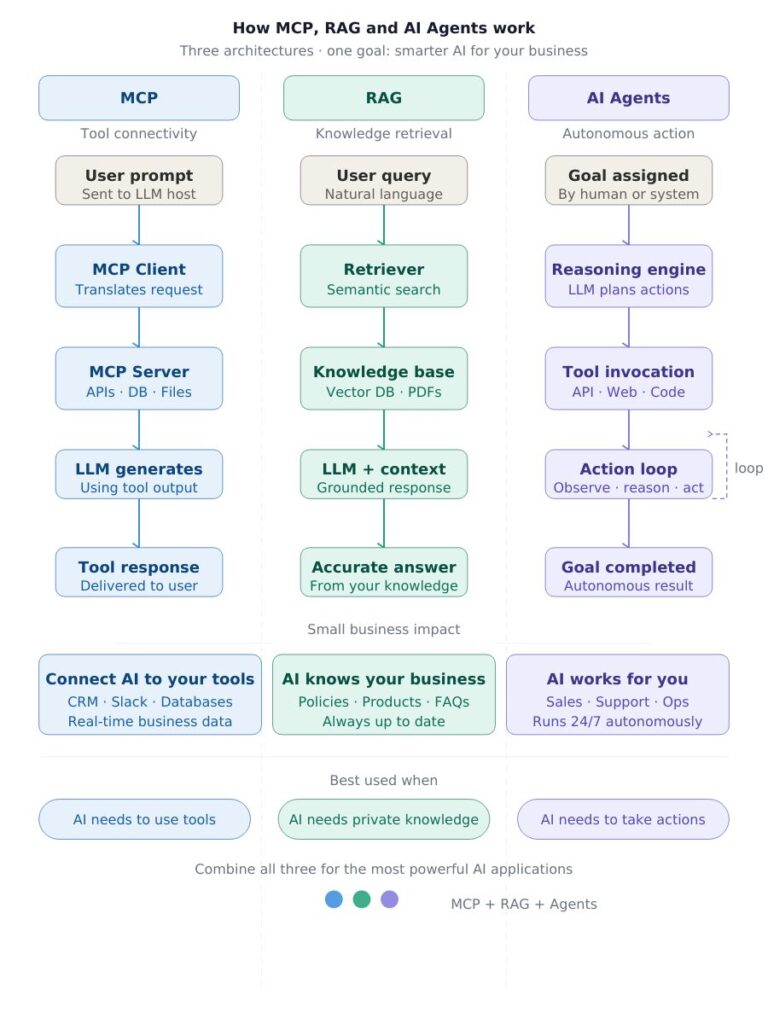
The MCP architecture revolves around three key components:
The MCP Host — This is the environment in which the LLM operates. It could be an AI assistant application, an IDE (Integrated Development Environment) like Claude Desktop, or any platform that runs an AI model. The host manages the overall AI session and coordinates communication.
MCP Clients — These are the interfaces within the host that connect to specific MCP servers. Each client handles the communication between the LLM and a particular external resource or tool. You can think of a client as a translator — it converts the LLM’s requests into a language that the server understands.
MCP Servers — These are the actual external systems or tools that the LLM wants to interact with. Each server provides a specific capability:
- MCP Server A connects to Web APIs — platforms like GitHub, Slack, and other internet services
- MCP Server B connects to databases, allowing the LLM to execute queries and retrieve structured data
- MCP Server C connects to the file system, allowing the LLM to read and write files
The communication between clients and servers flows through the MCP Protocol — the standardised messaging format that ensures everything speaks the same language regardless of which tools are involved.
The Big Idea Behind MCP (MCP vs RAG vs AI Agents)
Before MCP, connecting an LLM to external tools was a custom engineering job. Every integration required bespoke code, unique APIs, and significant development effort. MCP changes this by creating a universal standard — much like how USB standardised how devices connect to computers.
With MCP, a developer builds a tool once according to the MCP specification, and any MCP-compatible AI model can use it. This dramatically lowers the barrier to building AI-powered applications that interact with real-world systems.
How MCP Helps Small Businesses Grow (MCP vs RAG vs AI Agents)
MCP is the infrastructure layer that makes AI genuinely useful in business operations. Here is how small businesses can benefit:
Customer Support Automation with Tool Access A small business can deploy an AI assistant powered by MCP that connects directly to its CRM, ticketing system, and knowledge base. When a customer asks a question, the AI does not just generate a generic response — it pulls the actual customer’s account data, checks their order history, and provides a personalised, accurate answer. This reduces support costs dramatically while improving customer satisfaction.
Automated Business Reporting By connecting an LLM to your database via MCP, you can ask plain-language questions like “What were our top 10 products by revenue last quarter?” and receive immediate, accurate answers without needing a data analyst to write SQL queries. For small businesses where the owner wears multiple hats, this is transformative.
Seamless Tool Integration A small marketing agency can use MCP to connect their AI assistant to Slack, their project management tool, and their client database. The AI can then read project briefs, pull client information, draft campaign summaries, and post updates — all from a single interface. What used to take hours of manual coordination happens in minutes.
Development Productivity For tech-enabled small businesses, MCP connected to an IDE means developers can ask their AI assistant to read the codebase, understand the architecture, suggest improvements, and even write and test code against live databases — accelerating development cycles significantly.
Document Intelligence By connecting MCP to your file system, an AI assistant can read your contracts, proposals, invoices, and reports — then answer specific questions about them, summarise them, extract key terms, or flag anomalies. This turns your document library into a searchable, queryable intelligence resource.
The fundamental value of MCP for small businesses is this: it turns a general-purpose AI into a business-specific AI that knows your tools, your data, and your workflows.
Part Two: RAG — Retrieval-Augmented Generation
What Is RAG? (MCP vs RAG vs AI Agents)
RAG stands for Retrieval-Augmented Generation. It is an architecture that enhances LLM responses by retrieving relevant information from an external knowledge base at the time of the query and using that information to generate a more accurate, relevant, and up-to-date response.
The name describes the process perfectly: you retrieve relevant documents, then augment the LLM’s context with those documents, then allow the model to generate a response using that enhanced context.
In simple terms: RAG gives AI a memory and knowledge system beyond its training data.
How Does RAG Work? (MCP vs RAG vs AI Agents)
The RAG architecture involves a structured, multi-step process that happens every time a user asks a question:
Step 1 — User Query The process begins when a user submits a question or request. This could be typed into a chat interface, submitted via a business application, or triggered by an automated system.
Step 2 — Retriever Fetches Information The query is passed to a Retriever — a specialised component that searches the Knowledge Base for documents, passages, or data that are most relevant to the question. The Retriever typically uses semantic search (searching by meaning rather than exact keywords) to find the most contextually relevant information.
Step 3 — Return Documents The Retriever returns the most relevant documents or document excerpts from the Knowledge Base to the LLM. This might be a few paragraphs from a product manual, a specific section of a policy document, or a row from a customer database.
Step 4 — Query + Retrieved Docs Sent to LLM The original user query is combined with the retrieved documents and sent to the LLM (which could be GPT, Gemini, Claude, or any other model). The LLM now has both the question AND the relevant context it needs to answer accurately.
Step 5 — LLM Generates Response With access to both the question and the retrieved documents, the LLM generates a response that is grounded in your actual knowledge base — not just its general training data.
The Knowledge Base (MCP vs RAG vs AI Agents)
The Knowledge Base is the heart of any RAG system. It typically contains several types of data:
- PDF documents — product manuals, policy documents, research reports
- Vector Database — a specialised database that stores documents in a mathematical format (vectors) that enables semantic search
- Code — technical documentation, code repositories, API references
The Vector Database is what enables RAG’s powerful semantic search capability. Rather than searching for exact keyword matches (which often misses relevant results), a Vector Database finds documents that are conceptually similar to the query — even when the exact words do not match.
For example, if a user asks “What is the return policy?”, a vector search might retrieve documents containing phrases like “refund procedure”, “exchange terms”, or “money-back guarantee” — because they are semantically related to the query, even if they do not contain the words “return policy.”
This is called Runtime Knowledge Retrieval — the system retrieves the right knowledge at the exact moment it is needed.
How RAG Helps Small Businesses Grow (MCP vs RAG vs AI Agents)
RAG is arguably the most immediately practical AI architecture for small businesses. Here is why — and how to apply it:
Build Your Own Business Knowledge Assistant A small business can create a RAG system using all of its internal documents — employee handbooks, product catalogues, FAQs, client contracts, and policy manuals. The result is an AI assistant that any employee can query in plain language and receive accurate, business-specific answers instantly. New employee onboarding alone becomes dramatically faster and cheaper.
Always Up-to-Date Customer Support Unlike a standard LLM that may have outdated information, a RAG system pulls from your live knowledge base. Update a product specification, add a new FAQ, or change a pricing document — and your AI assistant immediately reflects that change. Your customers always receive accurate information.
Intelligent Document Search Law firms, consultancies, and professional services businesses often struggle with the sheer volume of documents they accumulate. A RAG system can search across thousands of documents instantly, surfacing the most relevant contracts, precedents, or reports in response to a plain-language query. What used to take hours of manual searching takes seconds.
Enhanced Sales Intelligence Equip your sales team with a RAG-powered assistant that has read every product brochure, customer case study, competitive analysis, and pricing guide. When a prospect asks a complex question, your salesperson can get an accurate, detailed answer in seconds — building credibility and accelerating the sales cycle.
Compliance and Policy Management For businesses operating in regulated industries, RAG can maintain an up-to-date knowledge base of all relevant regulations, policies, and compliance requirements. Staff can query the system for guidance on specific situations, significantly reducing compliance risk.
Cost-Effective Alternative to Re-Training Training or fine-tuning an LLM on your proprietary data is expensive and technically complex. RAG achieves much of the same outcome — a business-specific AI — at a fraction of the cost by simply maintaining an external knowledge base that the model queries at runtime.
The core value of RAG for small businesses is that it transforms a generic AI into a domain expert in your specific business — without the cost and complexity of building a custom AI model from scratch.
Part Three: AI Agents — Autonomous Intelligence in Action (MCP vs RAG vs AI Agents)
What Is an AI Agent?
An AI Agent is an AI system that does not just generate responses — it takes actions, makes decisions, and operates autonomously to accomplish goals. An AI Agent perceives its environment, reasons about what to do, takes actions using available tools, and adapts based on the results — all with varying levels of human oversight.
The defining characteristic of an AI Agent is its ability to act, not just speak.
Where a standard LLM responds to prompts and a RAG system retrieves and generates, an AI Agent does things — it interacts with the world on your behalf.
How Do AI Agents Work? (MCP vs RAG vs AI Agents)
The AI Agent architecture is the most complex of the three, involving multiple interconnected components that work together to enable autonomous action:
Human Control and Autonomy Level Every AI Agent operates on a spectrum of autonomy. At one end, a human approves every action before it is taken. At the other end, the agent operates fully autonomously. Most practical business applications sit somewhere in the middle — with humans setting goals and reviewing outcomes while the agent handles the execution.
The AI Agent Core The central AI Agent receives tasks delegated by human users or other systems. It is powered by an LLM that handles reasoning — deciding what to do, in what order, and how to respond to unexpected situations.
Memory AI Agents have memory systems that allow them to maintain context across multiple interactions and actions. This enables them to:
- Remember what they have already done in a multi-step task
- Learn from previous interactions to improve future performance
- Maintain a consistent understanding of the user’s goals and preferences
Tool Invocation One of the most powerful capabilities of AI Agents is their ability to invoke tools — calling external systems and APIs to accomplish tasks. Common tool categories include:
- API Calls — connecting to external services like payment processors, booking platforms, or data providers
- Access Internet — browsing the web to retrieve current information, research topics, or monitor competitor activity
- Interpret Code — writing and executing code to perform calculations, process data, or automate technical tasks
Reactivity and the Action Loop AI Agents do not just execute a single action and stop. They operate in an autonomous reasoning and action loop — taking an action, observing the result, reasoning about what to do next, taking another action, and continuing until the goal is achieved. This is what enables them to handle complex, multi-step tasks that would require significant human effort to coordinate manually.
Environment Interaction The agent interacts with its environment — the broader digital ecosystem it has access to. Through its tools and connections, the agent can read and write files, send emails, update databases, browse websites, and interact with virtually any digital system it has been given access to.
How AI Agents Help Small Businesses Grow (MCP vs RAG vs AI Agents)
AI Agents represent the frontier of practical AI for business — systems that do not just inform but actually execute. Here is where the transformative potential lies for small businesses:
Autonomous Lead Generation and Outreach An AI Agent can be tasked with researching target prospects, finding contact information, personalising outreach messages based on each prospect’s background, sending emails, following up with non-responders, and logging all activity in your CRM — without human intervention at each step. What would take a full-time sales development representative days can be accomplished overnight.
End-to-End Customer Journey Management An AI Agent can manage the entire customer journey — from initial inquiry through to post-purchase follow-up. When a new lead comes in, the agent can respond immediately, qualify the lead by asking smart questions, schedule a meeting with a human salesperson, send pre-meeting materials, follow up after the meeting, and nurture the prospect with relevant content — all autonomously, all personalised.
Intelligent Business Operations Small businesses often struggle with operational complexity — managing suppliers, tracking inventory, coordinating logistics, and monitoring cash flow. An AI Agent can monitor all of these simultaneously, flag issues that require human attention, and take pre-authorised actions (like reordering stock when levels fall below a threshold) automatically.
Autonomous Content Marketing A content-focused AI Agent can research trending topics in your industry, write blog posts, optimise them for SEO, schedule them for publication, share them on social media, monitor their performance, and adjust the content strategy based on what is working — creating a content marketing engine that runs largely without manual intervention.
Competitive Intelligence Monitoring An AI Agent can continuously monitor competitor websites, pricing pages, social media accounts, and industry news — alerting you immediately when a competitor launches a new product, changes their pricing, or makes a significant announcement. This real-time competitive intelligence is something most small businesses currently lack.
Automated Financial Operations For small businesses, financial administration is a significant time sink. An AI Agent connected to your accounting system can categorise expenses, reconcile invoices, flag unusual transactions, generate financial summaries, and prepare reports — freeing the business owner to focus on strategy rather than administration.
Customer Success at Scale An AI Agent can proactively monitor customer health indicators — usage patterns, support ticket history, payment behaviour — and take action when it detects early warning signs. If a customer has not logged in for two weeks after onboarding, the agent can automatically send a personalised check-in. If a customer raises their third support ticket in a month, the agent can escalate them to a human success manager. Customer success at scale, without a large customer success team.
The defining value of AI Agents for small businesses is this: they are not tools that help you do work faster — they are systems that do the work for you, while you focus on what only a human can do.
Part Four: MCP vs RAG vs AI Agents — Key Differences at a Glance
Understanding how these three architectures differ is essential for choosing the right approach for your specific business needs.
MCP is primarily about connectivity — giving AI models standardised access to tools, systems, and resources. It solves the problem of tool integration. Use MCP when you need your AI to interact with specific external systems in a structured, standardised way.
RAG is primarily about knowledge — giving AI models access to accurate, up-to-date, domain-specific information at query time. It solves the knowledge gap problem. Use RAG when you need your AI to answer questions accurately based on your proprietary information.
AI Agents are primarily about autonomy — enabling AI systems to take sequences of actions to accomplish goals without continuous human direction. They solve the automation problem. Use AI Agents when you need AI to actually do things, not just answer questions.
These three architectures are not mutually exclusive. In fact, the most powerful AI applications combine all three: an Agent that uses MCP to connect to tools, retrieves context via RAG from a knowledge base, and takes autonomous action in the world. This is the architecture behind the most sophisticated AI business applications being built today.
Part Five: A Practical Roadmap for Small Businesses
Stage 1 — Start with RAG (Immediate Value, Low Complexity MCP vs RAG vs AI Agents)
The fastest path to practical AI value for most small businesses is RAG. Start by identifying your most important internal knowledge assets — product documentation, FAQs, policy documents, and training materials. Build a simple RAG system that makes this knowledge queryable by your team and your customers.
Tools like Notion AI, Guru, and custom solutions built on platforms like LangChain or LlamaIndex make this accessible even without a dedicated development team.
Expected outcome: Faster customer support, more consistent employee knowledge, reduced time spent answering repetitive questions.
Stage 2 — Add MCP for Tool Integration (Medium Complexity MCP vs RAG vs AI Agents)
Once you have a working knowledge layer, extend your AI’s capabilities by connecting it to your core business tools via MCP or MCP-compatible integrations. Start with the tools your team uses most — your CRM, your project management platform, your communication tools.
Expected outcome: AI that understands your business context and can take simple, tool-based actions on your behalf.
Stage 3 — Deploy AI Agents for Automation (Advanced Capability MCP vs RAG vs AI Agents)
With a knowledge layer (RAG) and tool connections (MCP) in place, you are ready to deploy AI Agents for specific, high-value workflows. Start with one clearly defined process — lead qualification, content publishing, or invoice processing — and build an Agent that automates it end-to-end.
Expected outcome: Significant reduction in manual operational work, enabling the team to focus on higher-value activities that require human judgement.
Conclusion: The AI Architecture That Grows With Your Business
MCP, RAG, and AI Agents are not competing technologies — they are complementary layers of a complete AI architecture. Understanding each one, and knowing which to reach for in which situation, is one of the most valuable capabilities a business leader can develop in today’s AI-driven landscape.
The businesses that will thrive in the next decade are not necessarily the ones with the biggest budgets or the largest teams. They are the ones that understand how to deploy these architectures intelligently — using MCP to connect AI to their tools, RAG to give AI access to their knowledge, and AI Agents to put AI to work on their behalf.
The architecture is here. The tools are accessible. The only question is: where will you start?



One Comment